Colorful Gears Infographic Template Guide
Visualizing complex workflows often feels like trying to explain a machine without showing the moving parts. When you need to demonstrate how different elements of a project interlock, the Colorful Gears Infographic Template offers an immediate, universally understood metaphor. This design asset moves beyond standard bullet points by using mechanical imagery to represent synergy, progression, and systematic thinking. For professionals tasked with translating dense operational data into digestible visuals, this template serves as a bridge between technical accuracy and audience engagement.
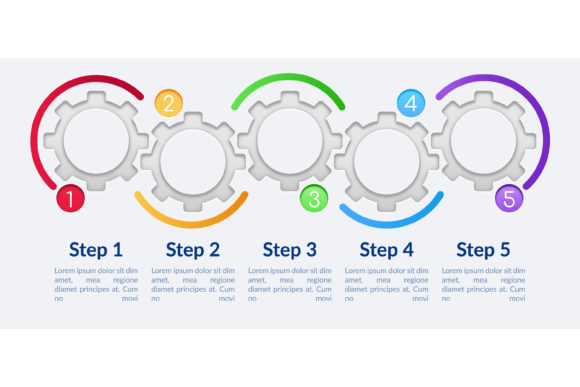
The primary strength of this specific vector infographic template lies in its balance of structure and flexibility. It features five distinct steps arranged in a process timeline chart, making it ideal for explaining sequential workflows or cyclical systems. Unlike rigid charts that force content into unnatural shapes, this layout provides ample copyspace within empty circles and adjacent text areas. This intentional negative space allows marketers and educators to customize the narrative without cluttering the visual hierarchy, ensuring the message remains the focal point rather than the decoration.
Core Design Features and Technical Specs
Understanding the technical foundation of this asset is crucial for seamless integration into your existing design ecosystem. The template is delivered in multiple industry-standard formats, including AI, EPS, SVG, PNG, and JPG. This versatility ensures compatibility whether you are working in Adobe Illustrator for print production or need a quick PNG export for a social media update. The vector-based nature of the AI and EPS files means you can scale the gears to billboard size without losing crispness, while the rasterized versions offer plug-and-play convenience for non-designers.
- Vector Scalability: The SVG and AI formats allow for infinite resizing, essential for responsive web design and high-resolution printing.
- Editable Components: Every gear, circle, and connector is a separate layer, enabling color adjustments and repositioning to match brand guidelines.
- Text-Ready Layout: Pre-defined text boxes reduce alignment guesswork, maintaining professional spacing even when content length varies.
- Vibrant Color Palette: The default colorful scheme draws attention to each step, but flat colors make recoloring straightforward for corporate branding.
The inclusion of empty circles as presentation design elements is particularly strategic. These act as visual anchors for icons, numbers, or key metrics, breaking up the horizontal flow of the timeline. This modularity transforms the graphic from a static illustration into a functional data visualization tool where information architecture takes precedence over artistic flair.
Practical Applications Across Industries
The utility of the Colorful Gears Infographic Template extends far beyond generic business presentations. Its mechanical aesthetic naturally suits contexts involving systems, logistics, and collaborative processes. In manufacturing and engineering sectors, it effectively illustrates assembly lines, quality control feedback loops, or supply chain dependencies. The gear metaphor resonates intuitively with technical audiences who value precision and interconnectedness.
However, creative and service-based industries find equal value in this workflow layout. Digital marketing agencies frequently use it to map out content calendars, SEO strategies, or campaign lifecycles where one phase triggers the next. Educators and trainers leverage the five-step structure to break down learning modules or onboarding procedures, turning abstract concepts into tangible progress markers. For entrepreneurs pitching to investors, the timeline chart demonstrates operational maturity, showing that the business model has defined stages and measurable outcomes rather than vague aspirations.
Freelancers and consultants also benefit from this template when creating case studies or service breakdowns. Instead of listing services in isolation, displaying them as interlocking gears suggests a holistic, integrated approach to problem-solving. This subtle psychological cue can differentiate a proposal from competitors who rely on standard lists, positioning the service provider as a systematic thinker rather than just a task executor.
Enhancing Communication Through Visual Metaphor
Data visualization succeeds when it reduces cognitive load. The human brain processes mechanical relationships faster than abstract hierarchies because we have physical experience with how gears work. When viewers see the Colorful Gears Infographic Template, they immediately understand that Step A drives Step B, and that removing one component halts the entire system. This implicit understanding eliminates the need for lengthy explanatory captions, allowing your copy to focus on insights rather than navigation instructions.
The colorful aspect of the template serves a functional purpose beyond aesthetics. Color coding each gear creates distinct visual zones that guide the eye through the timeline. This is especially valuable in dense presentations where audience attention may waver. By assigning specific hues to different departments, phases, or stakeholders, you create a secondary layer of information that reinforces the textual content. Just ensure sufficient contrast between text and background colors to maintain accessibility standards across all viewing environments.
Copyspace management is another critical communication factor. Many templates fail because they prioritize decorative elements over readability. This design deliberately reserves white space around the central mechanism, acknowledging that real-world content rarely fits perfectly into predetermined boxes. Whether you are adding detailed statistics or brief headlines, the layout accommodates variation without requiring extensive redesign. This adaptability saves hours of formatting time during iterative review cycles when stakeholder feedback inevitably changes the messaging.
Selection and Implementation Considerations
Before integrating this template into your project, evaluate whether the gear metaphor aligns with your specific narrative. While excellent for processes and systems, it may feel forced for topics centered on organic growth, emotional journeys, or non-linear creativity. Match the visual language to the content's inherent logic. If your workflow truly operates like a machine with discrete, dependent stages, this template will amplify your message. If your process is more fluid or chaotic, consider whether the structured rigidity enhances clarity or creates false impressions of order.
When customizing the file, start with the master vector version whenever possible. Editing the original AI or EPS file preserves editability for future updates, whereas modifying a flattened JPG locks you into current decisions. Establish a color system early that corresponds to your brand palette or the presentation's thematic coding. Consistency across multiple slides or documents builds visual coherence that strengthens audience retention.
Pay close attention to text hierarchy within the empty circles and accompanying spaces. Resist the urge to fill every available pixel with information. The template's effectiveness depends on breathing room that lets each step register individually. Use bold typography for stage names and lighter weights for descriptions to create scannable content blocks. Test legibility at actual display size before finalizing, as what reads well on a designer's monitor may become illegible when projected in a conference room or viewed on mobile devices.
Finally, consider the output format requirements for each distribution channel. Social media platforms favor high-contrast PNGs with simplified text, while printed reports demand CMYK color profiles and bleed-safe margins from the EPS source. Web presentations benefit from SVG exports that remain sharp on retina displays while keeping file sizes minimal. Understanding these technical nuances ensures the Colorful Gears Infographic Template performs optimally regardless of where your audience encounters it, maximizing both aesthetic impact and communicative efficiency.