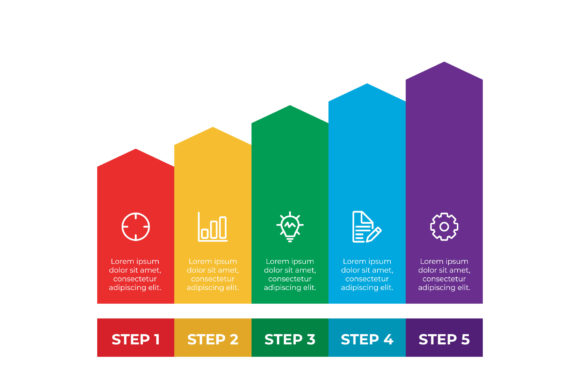
Evaluating Infographic Template V.3 for Professional Vector Design
Selecting the right visual asset is a critical step in professional content creation, particularly when balancing aesthetic quality with production efficiency. Infographic Template V.3 represents a specific category of design resources aimed at streamlining the creation of data-driven visuals. This template package provides a structured foundation for designers and marketers who require high-fidelity graphics without starting from a blank canvas. Understanding the technical specifications, practical applications, and inherent tradeoffs of this vector-based solution is essential for determining whether it aligns with current project requirements and long-term workflow goals.
Defining the Asset and Technical Specifications
Infographic Template V.3 is a pre-designed layout system optimized for information visualization. Unlike raster-based templates that rely on pixel manipulation, this resource is built entirely on vector mathematics, ensuring infinite scalability without quality loss. The package is defined by its 16:9 aspect ratio, a standard dimension compatible with modern presentation software, video backgrounds, and widescreen digital displays. This format distinguishes it from traditional vertical infographic templates, positioning it specifically for horizontal storytelling environments.
The deliverables included in this package dictate its utility across different software ecosystems. Users receive an Adobe Illustrator CC file, which serves as the primary source for editing. This file retains all layer structures, smart objects, and editable text fields necessary for customization. Additionally, an EPS 10 file is provided to ensure backward compatibility with older versions of vector software or alternative platforms like CorelDRAW and Inkscape. A preview JPEG is also included, allowing stakeholders to approve the visual direction before the designer begins the labor-intensive customization process. This multi-format approach reduces friction in collaborative environments where team members may use varying tools.
Strategic Reasons for Adoption
Professionals typically evaluate Infographic Template V.3 when facing constraints related to time or budget. Creating a cohesive infographic from scratch requires significant hours dedicated to grid setup, typography hierarchy, and icon alignment. This template eliminates the foundational phase of design, allowing creators to focus immediately on content population and narrative flow. For agencies managing high-volume output, this reduction in setup time translates directly to improved margins and faster turnaround times.
Beyond efficiency, consistency is a primary driver for adoption. Organizations maintaining strict brand guidelines often struggle with ad-hoc design work that deviates from established visual standards. Because Infographic Template V.3 utilizes a unified design language, it helps maintain visual coherence across multiple assets. When used as part of a broader suite of templates, it ensures that quarterly reports, marketing materials, and internal presentations share a recognizable aesthetic structure, reinforcing brand identity through repetition.
Benefits and Practical Advantages
The primary benefit of this vector template lies in its editability. Text elements are not outlined, meaning they remain fully accessible for modification. This is crucial for localization, updating statistics, or adjusting messaging for different audience segments. Designers can swap colors globally using swatches rather than selecting individual shapes manually, significantly accelerating the rebranding process.
- Scalability: The vector nature ensures crisp rendering at any size, from thumbnail previews to large-format prints.
- Layer Organization: Properly grouped layers reduce cognitive load during editing, making it easier to isolate specific chart elements or background textures.
- Cross-Platform Flexibility: The inclusion of EPS 10 mitigates version conflicts in diverse technical environments.
- Presentation Ready: The native 16:9 ratio removes the need for cropping or resizing when embedding into slide decks.
Furthermore, the structural integrity of the template supports data accuracy. Pre-built chart components often include guides and alignment markers that help prevent common visualization errors, such as misaligned axes or inconsistent spacing. This built-in quality control assists non-designers in producing professional-grade results without extensive training.
Tradeoffs and Critical Considerations
Despite its advantages, Infographic Template V.3 introduces specific limitations that must be weighed during evaluation. The most significant tradeoff is the learning curve associated with Adobe Illustrator. While the text is editable, modifying complex vector shapes or altering the fundamental layout requires intermediate-to-advanced proficiency. Users accustomed to drag-and-drop web builders may find the anchor point manipulation and pathfinder operations intimidating or inefficient.
Another consideration is the risk of generic aesthetics. Because templates are sold to multiple users, there is a possibility of visual overlap within the same industry. Without significant customization—such as replacing default icons, adjusting color palettes, or restructuring sections—the final output may lack distinctiveness. Evaluators must assess whether their team has the creative capacity to transform the base template into something unique, or if the out-of-the-box look suffices for their needs.
Technical compatibility also warrants scrutiny. While EPS 10 offers broad support, certain advanced effects used in the Illustrator CC file may not translate perfectly to older formats or non-Adobe software. Users relying exclusively on free or open-source vector tools should test the EPS file before purchase to ensure that gradients, meshes, and transparency effects render as expected.
Situational Fit and Alternative Options
Infographic Template V.3 is a strong fit for organizations with established design workflows and access to vector editing software. It is particularly valuable for B2B companies producing regular white papers, SaaS platforms explaining feature sets, and educators creating course materials for widescreen displays. In these contexts, the horizontal format and professional polish justify the investment.
However, alternatives may be superior in specific scenarios. If the primary distribution channel is social media or mobile devices, a vertical or square template would offer better engagement metrics than a 16:9 layout. For teams lacking vector design skills, browser-based tools like Canva or Figma might provide a more accessible, albeit less technically robust, solution. These platforms often sacrifice print-ready resolution and granular control but lower the barrier to entry significantly.
Additionally, if the data visualization requirements are highly dynamic or interactive, a static vector template may be insufficient. In such cases, investing in data visualization libraries or specialized dashboard tools would yield better functional outcomes than adapting a static design asset.
Making an Informed Decision
Determining whether Infographic Template V.3 meets organizational needs requires a pragmatic assessment of resources versus objectives. Decision-makers should verify that their team possesses the requisite Illustrator skills to leverage the editable text and vector components effectively. They should also confirm that the 16:9 aspect ratio aligns with their primary distribution channels. If the goal is rapid, consistent production of horizontal visual content and the technical prerequisites are met, this template serves as a reliable productivity multiplier. Conversely, if flexibility, ease of use, or mobile optimization takes precedence, exploring alternative formats or platforms will likely result in a more sustainable workflow.