Integrating the Office Ergonomics Advices Infographic into Workplace Wellness Workflows
Effective workplace health initiatives often fail not because of a lack of information, but because of a lack of accessible communication. The Office Ergonomics Advices Infographic serves as a critical bridge between technical safety guidelines and daily employee behavior. Rather than functioning as a standalone poster, this visual asset is designed to be a modular component within a broader organizational wellness strategy. For professionals, HR managers, and safety officers, understanding how to deploy this resource effectively requires viewing it through the lens of process design and workflow integration.
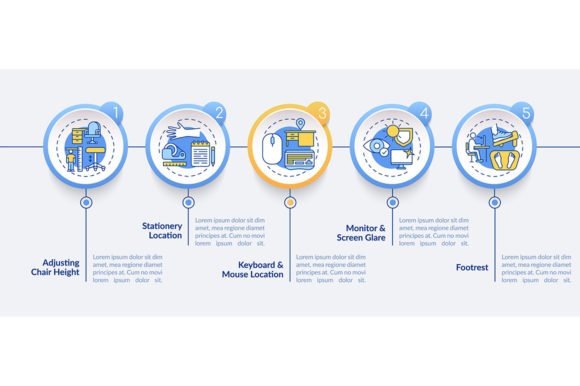
This infographic template provides a structured framework for communicating complex physical setup requirements through simplified data visualization. By utilizing a five-step process timeline and linear iconography, it transforms abstract ergonomic concepts into actionable checkpoints. Whether you are managing a corporate office, a remote team, or a hybrid workforce, integrating this visual tool into your operational routine ensures that health standards are maintained consistently without disrupting productivity.
Strategic Placement in the Project Lifecycle
The utility of an ergonomics infographic extends far beyond a one-time safety briefing. To maximize its impact, it must be embedded at specific touchpoints throughout the employee lifecycle and facility management processes. Treating the Office Ergonomics Advices Infographic as a dynamic workflow element rather than static decoration changes how teams interact with their physical environment.
Pre-Implementation and Onboarding
Before new hires sit at their desks or existing staff transition to new equipment, the infographic acts as a primary reference standard. During the onboarding phase, it should be integrated into digital welcome packets and physical orientation sessions. This early exposure establishes a baseline expectation for workspace configuration. Instead of relying solely on verbal instructions, which are easily forgotten, providing a high-resolution PNG or JPG version of the infographic gives employees a persistent visual guide they can reference while setting up their monitors, chairs, and peripherals.
Active Workflow and Daily Reinforcement
During active work periods, the infographic supports habit formation. Placing printed versions in high-traffic areas or embedding the SVG version in internal wikis creates environmental cues that prompt self-correction. For remote workers, this asset can be included in monthly wellness newsletters or pinned in collaboration channels like Slack or Teams. The linear icon layout is specifically designed for quick scanning, allowing users to verify their posture or desk setup in seconds without reading dense text. This reduces friction and makes compliance feel like a natural part of the workday rather than an administrative burden.
Post-Assessment and Auditing
After implementing ergonomic interventions, the infographic serves as a standardized audit tool. Safety committees and facilities managers can use the five distinct steps outlined in the design as a checklist during workstation assessments. Because the visual language is consistent, it eliminates ambiguity when evaluating whether a setup meets company standards. Data gathered from these assessments can then inform future training needs, creating a feedback loop where the infographic helps identify gaps in understanding or equipment deficiencies.
Technical Integration and Asset Compatibility
The practical value of the Office Ergonomics Advices Infographic is heavily dependent on its technical versatility. The inclusion of EPS, JPG, PNG, and SVG formats in the ZIP file ensures compatibility across various platforms and media types. Understanding which format to use for specific workflow tasks is essential for maintaining professional quality and brand consistency.
- SVG (Scalable Vector Graphics): Ideal for web-based presentations, intranets, and responsive design. This format maintains crisp edges at any zoom level, making it perfect for interactive safety modules or digital signage that may be viewed on everything from mobile phones to large lobby displays.
- EPS (Encapsulated PostScript): The industry standard for print production and professional editing. Use this file when sending materials to commercial printers for large-format posters or when a graphic designer needs to customize colors and typography to match corporate branding guidelines.
- PNG: Best for digital documents, slide decks, and internal communications where transparency is required. Unlike JPGs, PNGs preserve clean lines and text sharpness against varied backgrounds, ensuring the infographic remains legible when overlaid on photos or colored slides.
- JPG: Suitable for quick sharing via email or social media where file size is a constraint. While less ideal for text-heavy content due to compression artifacts, it serves well for low-bandwidth environments or casual reminders.
For creators and marketers repurposing this content, the vector nature of the source files allows for seamless adaptation. You can isolate individual icons for use in app interfaces or extract specific timeline segments for focused micro-learning videos. This modularity prevents the need to recreate assets from scratch, saving significant time and ensuring visual coherence across all safety-related materials.
Optimizing Communication Through Visual Hierarchy
The effectiveness of safety communication relies on cognitive load management. The Office Ergonomics Advices Infographic utilizes a five-step data visualization model to break down ergonomic best practices into digestible units. This structure aligns with how adults process instructional information, moving from general awareness to specific action.
When customizing or presenting this infographic, maintain the integrity of the linear workflow. Each step should represent a distinct category of adjustment, such as chair height, monitor distance, keyboard positioning, lighting, or break frequency. Avoid overcrowding these sections with excessive text. The accompanying stationery and technology presentation design elements included in the template package are intended to support the core message, not compete with it. Use whitespace strategically to guide the viewer’s eye through the timeline logically.
For educators and trainers, this visual hierarchy supports scaffolded learning. You can introduce one step per week or focus entire training sessions on specific segments of the timeline. This approach prevents information overload and allows for mastery of each ergonomic principle before moving to the next. The consistent iconography reinforces memory retention, helping employees associate specific visual symbols with correct physical behaviors over time.
Workflow Examples for Diverse Professional Contexts
Different professional environments require tailored approaches to deploying ergonomic resources. The flexibility of the infographic template allows it to adapt to various operational realities while maintaining core safety messaging.
Corporate Facilities Management
In large organizations, standardization is key. Facilities teams can use the EPS file to produce uniform signage for hundreds of workstations. Integrating the infographic into the ticketing system for equipment requests ensures that replacement furniture is ordered with ergonomic standards in mind. When employees submit a discomfort report, the response can include a link to the digital infographic, encouraging immediate self-assessment before a formal evaluation is scheduled.
Remote and Hybrid Teams
For distributed workforces, physical oversight is impossible. Here, the infographic becomes a proxy for direct supervision. Managers can incorporate the five-step checklist into quarterly check-ins or performance reviews focused on well-being. Providing downloadable assets allows remote workers to print their own guides or set them as desktop wallpapers. This empowers individuals to take ownership of their home office setup using the same standards applied in the central office.
Creative Agencies and Studios
Creative professionals often have unique setups involving drawing tablets, multiple monitors, or specialized hardware. Designers can modify the vector template to reflect these specific tools while keeping the underlying ergonomic principles intact. The ability to edit icons and text means the infographic can speak directly to the nuances of creative workflows, addressing issues like stylus grip or color grading posture that generic templates might miss.
Quality Control and Long-Term Maintenance
Implementing an ergonomic infographic is not a "set and forget" task. To ensure long-term relevance, establish a review cycle aligned with equipment upgrades or regulatory changes. When new technology is introduced to the workplace, update the infographic to reflect proper usage patterns. Using the master EPS or SVG files makes these updates efficient, avoiding the cost and inconsistency of redesigning materials from scratch.
Monitor engagement metrics to assess effectiveness. If using digital versions, track click-through rates or time spent on pages featuring the infographic. For physical installations, conduct periodic surveys to determine if employees find the guide helpful or if they have become desensitized to it. Rotating the placement of posters or refreshing the color scheme using the template’s customization options can help maintain visibility and attention.
Finally, ensure that the advice depicted remains evidence-based. Ergonomic science evolves, and what was considered best practice five years ago may now be outdated. Collaborate with occupational health specialists to validate the content before publishing updates. This commitment to accuracy builds trust and reinforces the organization’s dedication to genuine employee welfare rather than mere compliance.
By treating the Office Ergonomics Advices Infographic as a living component of your operational workflow, you transform a simple graphic into a powerful driver of workplace health. Its combination of versatile file formats, structured data visualization, and adaptable design elements makes it an indispensable tool for modern professionals committed to sustainable productivity. Success lies not just in possessing the asset, but in systematically integrating it into the rhythms of daily work life.